
Published on
 Guillaume Ojardias
I’m a Backend Developer, and I Finally Opened Figma (Claude Held My Hand)
For years, Figma was other people’s tool. A Django developer’s take on producing 14 screens in a day with Claude Desktop, and why Fusily is getting a Figma file again.
Interfaces were someone else’s job
I’m a backend developer, specialized in Django. My playground is data models, APIs, SQL queries, and everything that happens once the user has clicked. What they click on, though, has never really been my business.
In the teams I’ve worked with, the interface belonged to UI designers and frontend developers. Mockups arrived in Figma, clean and well thought out, and my work started where theirs ended. A comfortable division of labor that let me get away with never opening the tool in anything but view-only mode.
Then I started Fusily, and that comfort was gone.
Fusily’s early days: alone with the interface
Fusily is a recipe and meal-planning mobile app that I’m building mostly on my own. When the project was just getting started, I had no designer and no frontend developer on hand. Just me, a fairly clear idea of the product, and an equally clear inability to turn it into visuals.
For the “starter pack”, I hired two freelancers:
- the first for the brand identity: logo, fonts, colors;
- the second to design the first main screens of the app, so I wouldn’t be starting from a blank page.
That collaboration produced a Figma file of about twenty screens: sign-in, the recipe feed, recipe creation, search, recipe details, the step-by-step cooking mode, the weekly plan, the shopping list…
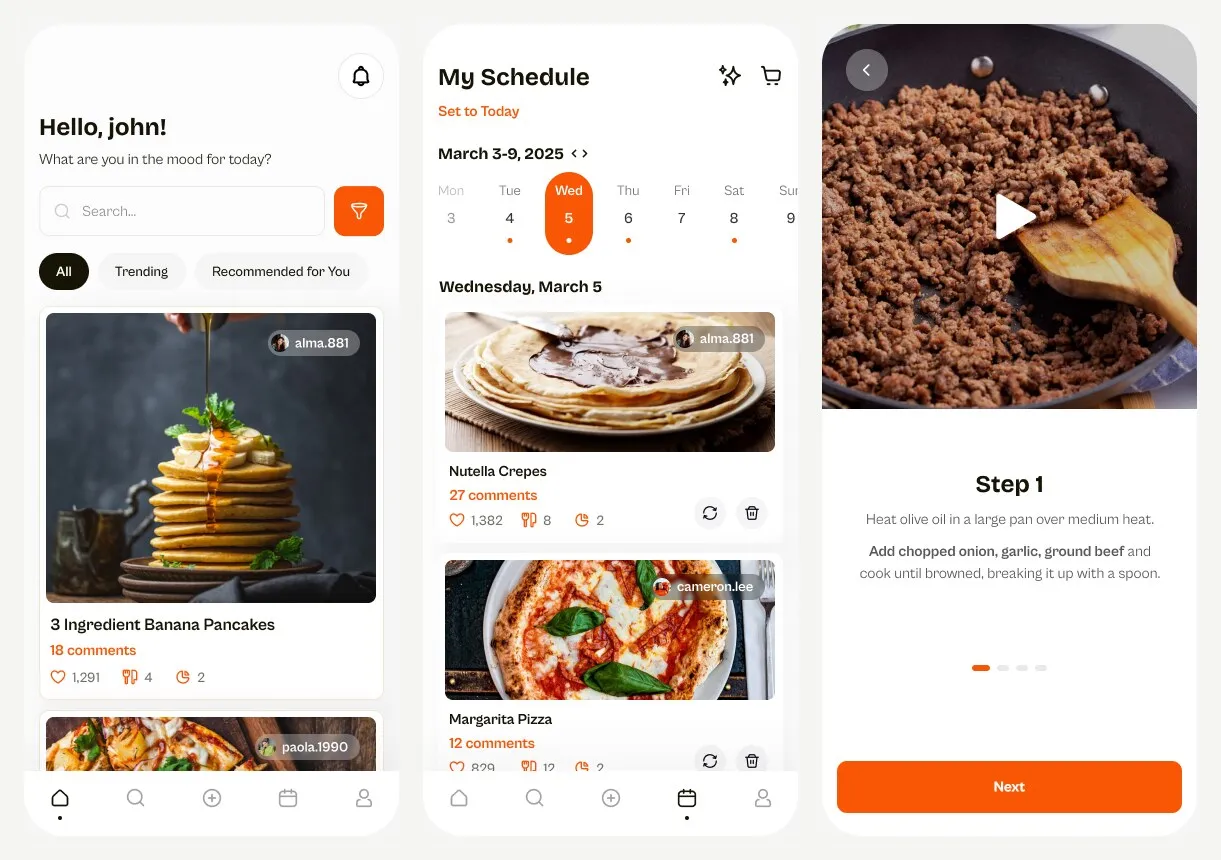
A file like that is a valuable tool to work with. You can see what the app might look like, step through the screens, and check that the flow holds up, all before writing a single line of code. For a developer, that’s a luxury: every inconsistency caught in a mockup is one less rewrite in the code.
A Figma file frozen in time
Except that file never kept up with the app, which changed a great deal. I switched UI frameworks along the way, new screens appeared, others were reworked based on real-world use, and entire features were born directly in the code. Meanwhile, the file stayed in its original state, like a family photo nobody ever updates.
I could list plenty of good (or very bad) reasons for abandoning it: lack of time, features taking priority, coding directly being faster, no designer to bounce ideas off…
But really, it comes down to one reason: I didn’t know how to use Figma, and I hadn’t taken the time to learn.
Frames, constraints, auto layout, components, variants, prototype mode: from the outside, Figma looks like an airplane cockpit. And when you’re alone on a product with a thousand other things to do, it’s tempting to leave the cockpit to someone else.
An e-commerce project and a day with Claude Desktop
Recently, for a potential e-commerce project, I set out to produce Figma screens that the client and I could work from and discuss. Show, don’t tell.
To be completely honest, I didn’t take the time to binge tutorials and do everything myself. I brought in my go-to work companion these days: Claude Desktop, connected to Figma.
The result surprised me. In one day, I produced 14 screens, linked together into an interactive prototype that I can present as if the site already existed: you click, move from page to page, and follow the flow. The prospective client isn’t flipping through a series of images; they’re actually trying the product.
I’ll admit the experience went to my head a little. Going from “I don’t dare open Figma” to “here’s the full flow, shall we discuss it?” that quickly does something to you.
Thinking in components: a developer’s reflex
What helped me most, in the end, was my experience as a developer.
Figma leans on a principle every developer knows by heart: the component. A button, a product card, a form field, a header: you create it once, define its variants (primary, secondary, disabled…), and reuse it everywhere. Editing the main component updates all its instances, except for properties overridden locally. It’s the same logic as a React component, or a Django template included in several pages: variants play the role of props.
So that’s where I focused my attention. Rather than letting each screen live its own life, I asked Claude to standardize the mockup’s elements as much as possible: components for everything that repeats, variants rather than slightly tweaked copies, consistent colors and spacing from one screen to the next.
I saw two benefits:
- the mockup stays consistent: the same element looks the same everywhere;
- implementation will be simpler: each Figma component is meant to become a component in the code. When development starts, the list of building blocks will already be there.
Claude knows its way around the tool far better than I do, and works fast. But I decide the structure: what deserves to be a component, which variants to plan for, how to break a screen down. Just like in a code project: the AI writes, but architecture remains a matter of judgment.
I’m not a designer
I don’t consider myself a design specialist. Design is a profession, one that takes specific training and a particular appetite for subjects (typography, composition, visual hierarchy, user research…) that I don’t have.
Claude didn’t make me a designer, just as AI doesn’t make you a developer. What it did was save me a huge amount of time getting to grips with the tool, and remove the barrier to entry that had kept me away. But the decisions that matter were mine, and on an ambitious project, a real designer’s eye remains irreplaceable.
What I bring
That said, I do bring something else to the table.
I have an app builder’s eye: I know what will be easy or painful to build, what will hold up in daily use, what a flow is missing to work end to end. I care about delivering the best possible user experience: Fusily taught me that every detail matters when you’re cooking with flour on your hands.
Now that Figma no longer scares me, that’s another string to my bow. One more step toward delivering complete projects on my own: from the mockup you show the client to the API running in production.
The reverse path: giving Fusily a Figma file again
And since the experiment worked, I’m going to take it all the way by doing the reverse for Fusily.
The idea: rebuild a complete Figma file from the app as it stands today. No longer the freelancers’ original mockup, but a faithful reflection of what users actually have in their hands, with the same rigor around components.
This file isn’t meant to become yet another snapshot. I want to make it part of my workflow: whenever a screen needs to evolve or a new feature comes along, I’ll go through Figma first to lay out the flow, validate it and discuss it, before opening the code editor. The same luxury as at the very start of the project, but this time without depending on someone else to keep it up to date.
The original file ended up gathering dust because I didn’t know how to use it. That excuse no longer holds.
The project this article is about: Fusily


